

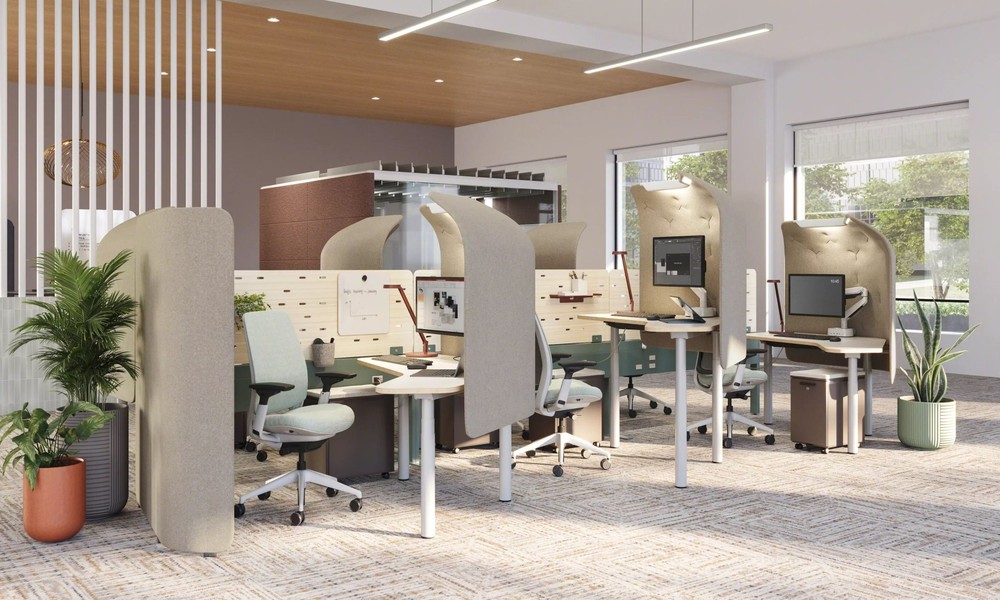
Accessibility in workstation design shapes how efficiently tasks are completed and how comfortably individuals interact with their environment. A thoughtfully designed setup removes unnecessary obstacles and allows users to work with greater ease. Proper accessibility supports physical comfort, reduces strain, and ensures that workstations remain practical for a wide range of users.
Modern workplaces rely on adaptable solutions that respond to different needs without disrupting workflow. For example, organizations sometimes look to providers such as Xybix Systems to understand how structured layouts and adjustable components improve usability. Accessibility extends beyond basic adjustments and focuses on creating an environment where every element supports smooth and consistent interaction.
Why Accessibility Matters In Work Environments
Accessible workstations create an environment where tasks can be completed efficiently without physical or cognitive strain. Proper alignment of equipment reduces the risk of discomfort and supports long-term health. Adjustable components allow users to tailor their setup to match their specific requirements.
Workplaces that prioritize accessibility sometimes experience improved workflow consistency. Employees can focus on responsibilities without interruptions caused by discomfort or limited mobility. This approach also supports inclusivity by ensuring that individuals with different abilities can contribute effectively.
Key Elements Of Accessible Workstation Design
Several practical elements define an accessible workstation. Each feature plays a role in maintaining usability and comfort:
- Adjustable Furniture: Height-adjustable desks and chairs allow proper posture and reduce physical strain during extended use.
- Clear Reach Zones: Frequently used tools remain within easy reach, minimizing unnecessary movement.
- Ergonomic Input Devices: Keyboards and pointing devices support natural hand positioning and reduce repetitive stress.
- Visual Clarity: Proper lighting and screen placement reduce eye fatigue and improve focus.
- Simple Layouts: Organized work surfaces prevent clutter and support efficient task completion.
Each of these elements contributes to a workstation that adapts to the user rather than forcing the user to adapt to the environment.
How Accessibility Improves Daily Performance
Accessible design supports steady performance by reducing physical and mental fatigue. When equipment is positioned correctly, users can maintain focus for longer periods without discomfort. This consistency leads to fewer interruptions and more reliable output.
Established providers such as Xybix Systems sometimes highlight the importance of aligning workstation components with actual task demands. This method ensures that every adjustment contributes to usability and supports efficient task completion without unnecessary modifications.
Practical Steps To Enhance Accessibility
Improving workstation accessibility involves targeted adjustments based on user needs:
- Assess Task Requirements: Identify how tasks are performed and adjust the setup to support those actions.
- Incorporate Flexible Equipment: Use tools that can be easily modified to suit different users.
- Maintain Organized Spaces: Keep essential items positioned logically to reduce time spent searching.
- Evaluate Regularly: Periodic reviews ensure that the workstation continues to meet changing needs.
These adjustments ensure that workstation components remain easy to access and operate during daily tasks. Consistent layout organization reduces physical strain and supports a smooth workflow. Regular review of these elements helps maintain accessibility as work requirements change.
Find Specialists For Accessible Control Room Workstations
Control room environments require precise accessibility planning to maintain continuous operations. Specialists evaluate equipment placement, screen visibility, and user reach to ensure smooth interaction with systems. Their work supports stable performance in high-demand settings.
Experienced professionals apply structured design principles to maintain efficiency under constant use. Accessibility improvements reduce delays and support accurate task execution. This ensures long-term reliability in complex workstation environments.
The Long-Term Value Of Accessible Design
Accessible workstation design supports long-term efficiency and well-being. Consistent comfort reduces the likelihood of fatigue-related errors and supports sustained productivity. Clear layouts and adaptable features make it easier to handle changing tasks without disrupting workflow.
Work environments that integrate accessibility into design practices create a stable foundation for daily operations. Each adjustment, whether small or significant, contributes to a workspace that supports performance, comfort, and reliability.
